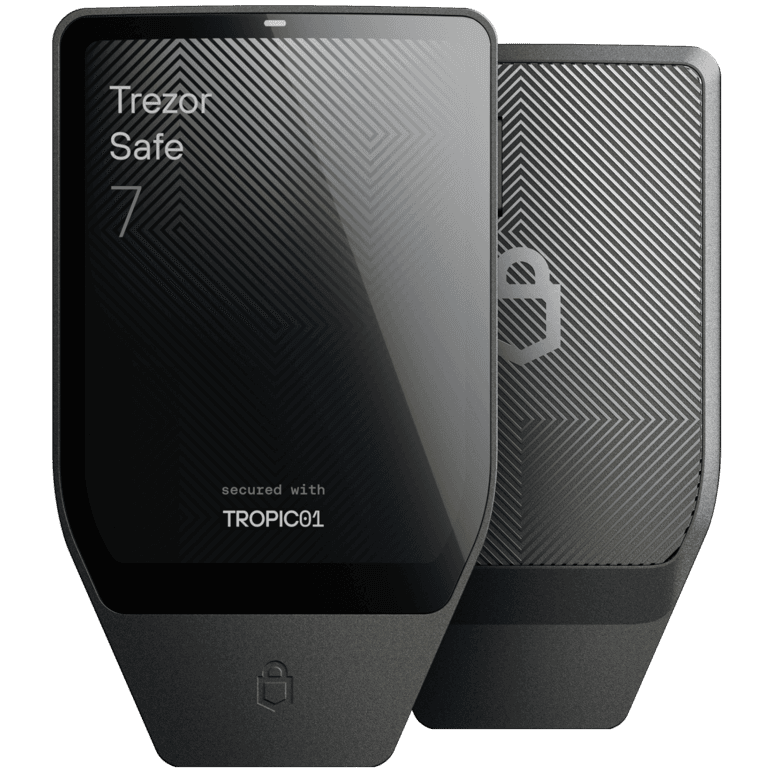
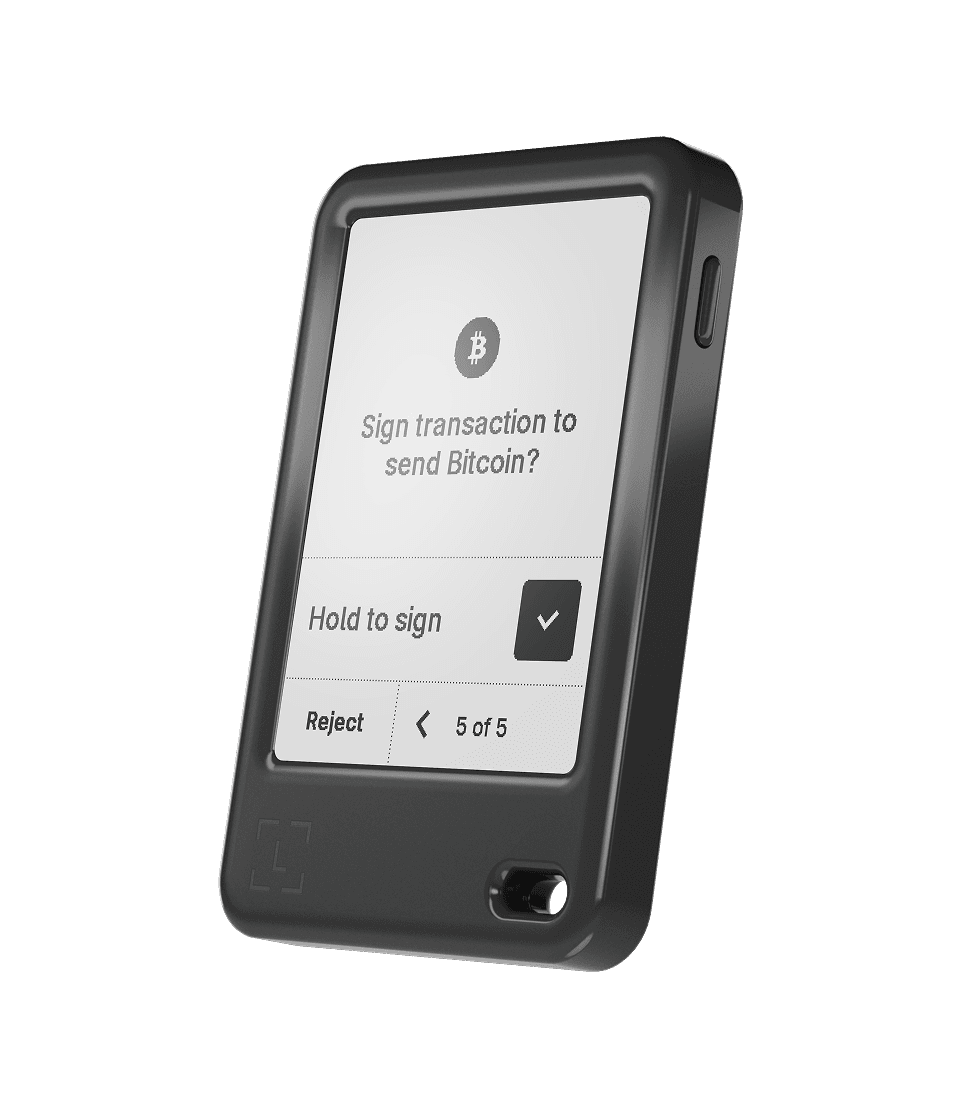
Direct manufacturer link. No affiliate commission is active. Check current specifications, price, seller and recovery design before purchase.
No hands-on tests or live prices are claimed here. The product photos and specifications are from manufacturers, not proof of safety. Six approaches and their dated independent evidence remain available below. Any paid link is identified next to its destination. Commissions do not buy editorial placement.
Choose the next step that fits
Already chose Ledger Nano Gen5?
Go to the exact US product listing
Nano Gen5, Black. The link specifies the Ledger Official seller; verify that seller, the model and the condition before paying. Availability and the displayed seller can change.
Trezor Safe 7: we have not verified an exact US Amazon offer. Use the manufacturer link above, rather than buying a different model by mistake. Still researching? Compare learning resources
See the differences, side by side.
Code openness, display, backup, charging and connection.
Which loss is more plausible for you: backup loss, backup theft, blind signing, device compromise, physical extraction, software error, or an heir who cannot recover the funds?
Backup loss
Control: Geographically separate durable backups and a tested restore
Limit: More copies increase theft and coercion exposure.
Backup theft
Control: Threshold shares, a well-understood passphrase, or controlled physical separation
Limit: A forgotten passphrase or unavailable share can be indistinguishable from theft loss.
Blind signing
Control: Trusted-display verification and clear signing for the exact supported action
Limit: Unsupported contracts may still appear as hashes or opaque data.
Device or supply-chain compromise
Control: Official purchase path, authenticity checks, firmware verification, and a newly generated backup
Limit: Authenticity checks reduce risk; they do not prove every component or build is defect-free.
Physical extraction
Control: Secure-element design, PIN policy, passphrase or share separation, and realistic possession assumptions
Limit: Published attacks differ in cost, prerequisites, destructiveness, scope, and whether key material is actually reachable.
Inheritance failure
Control: Plain-language inventory, tested instructions, role separation, and periodic rehearsal
Limit: A secret plan that heirs cannot locate or execute is not a recovery plan.
Can a hardware wallet prevent every loss?
No. It does not stop you approving a malicious transaction, exposing recovery material or losing access without a recovery plan. Inspect the exact action being signed.
No universal safest-wallet claim or numeric security score.
No credit for a large supported-asset count unless the exact network and signing flow are verified.
No claim that open source, a secure element, air-gapping, or a touchscreen eliminates every attack path.
No price, stock, firmware, or compatibility statement should be treated as permanent.
A scoped laboratory finding does not prove complete product compromise or complete product safety.
What should I check about the seller?
Start with the manufacturer or verify an authorized seller, authenticity procedure, shipment and return policy. Never use a device supplied with a pre-written seed phrase.
Security notes, without a pretend winner
July assessment. Manufacturer claims, laboratory findings and editorial interpretation are kept separate.
Trezor Safe 7 / dated security evidence
Review boundary: Read both the independent TROPIC01 disclosure and Trezor's response. Decide whether the required physical access, laboratory capability, layered key isolation, and unpatchable chip issue fit your threat model. This entry is dated 2026-07-14; it is not a current security clearance.
Vendor claim
Trezor describes Safe 7 as an open-source device with two secure elements plus an MCU, a large touchscreen, USB-C, Bluetooth, full iOS support, and multi-share backup support.
Independent lab finding
Ledger Donjon reported a laser fault-injection path against TROPIC01 firmware verification and later attack stages after invasive chip access and arbitrary-code prerequisites.
Vendor claim
Trezor says Safe 7 uses three independent security layers, does not store keys or backups on TROPIC01, and that the disclosed path does not expose customer funds remotely.
Editorial interpretation
The disclosure is not a remote exploit and requires specialist physical work, but the hardware issue cannot be patched. It belongs in the purchase decision rather than being dismissed or generalized into total compromise.
Fit in the July model
A buyer who values open design, a large display, full iOS support, and broad asset coverage.
A household prepared to rehearse a multi-share recovery and document inheritance.
Not a fit
A buyer who will not accept a product carrying a new, hardware-level physical-lab disclosure.
A minimalist Bitcoin-only user who does not need wireless, battery, or broad ecosystem features.
Vendor advisory; product-level impact depends on the complete architecture and threat model.
Ledger Nano Gen5 / dated security evidence
Review boundary: Document whether Ledger Recover will remain disabled or be accepted. Review the service terms, identity process, fragment model, and jurisdictional trust before subscribing. This entry is dated 2026-07-14; it is not a current security clearance.
Vendor claim
Ledger lists a 2.8-inch E Ink touchscreen, USB-C, Bluetooth, NFC, Secure Element protection, broad asset support, and an included PIN-protected Recovery Key.
Vendor claim
Ledger states that Ledger apps, SDKs, and several components are open while parts of Ledger OS and low-level code cannot be fully open because of secure-element supplier agreements.
Vendor claim
Ledger Recover is an optional subscription that encrypts and divides recovery material into three fragments, with two required for identity-verified recovery.
Editorial interpretation
The optional service is not forced, but it creates a different trust model. Partial reviewability is a hard mismatch for users whose policy requires fully inspectable firmware.
Fit in the July model
A buyer prioritizing broad network support, a polished companion ecosystem, and a larger display.
A user who understands the difference between the offline Recovery Key and the optional Ledger Recover subscription.
Not a fit
Anyone requiring the complete device operating system and low-level secure-element code to be publicly reviewable.
Anyone who cannot separate optional identity-verified cloud recovery from the default offline backup model.
Legal terms can change and differ by jurisdiction; not a technical audit of service providers.
BitBox02 Nova / dated security evidence
Review boundary: Verify the exact network in the current support matrix. Do not infer Solana, XRP, token, NFT, or contract support from general EVM compatibility. This entry is dated 2026-07-14; it is not a current security clearance.
Vendor claim
BitBox describes open-source firmware and app code, reproducible builds, a dual-chip architecture, an EAL6+ secure chip, and microSD-based backup.
Vendor claim
Nova supports desktop, Android, and iOS through USB-C and optional Bluetooth Low Energy that can be disabled.
Editorial interpretation
Its narrower first-party asset scope is a benefit only when it matches the portfolio. It is a hard mismatch for unsupported networks, not a reason to improvise with an unverified integration.
Fit in the July model
A Bitcoin or focused EVM user who prefers open firmware, reproducible builds, and a simple companion app.
An iPhone user who wants wireless access but also wants the option to disable it.
Not a fit
A broad multichain user who needs native Solana, XRP, or a large catalog inside one first-party app.
Anyone who needs a large touchscreen for detailed transaction review.
Compatibility is version-dependent and does not guarantee every token or contract action is decoded.
COLDCARD Mk5 / dated security evidence
Review boundary: Complete a full PSBT round trip and recovery rehearsal before funding. Bitcoin-only and air-gapped do not compensate for an owner who cannot verify files, addresses, fees, change, or backups. This entry is dated 2026-07-14; it is not a current security clearance.
Vendor claim
Coinkite describes Mk5 as a Bitcoin-only signer with dual secure elements, open and reproducible firmware, microSD, NFC, USB-C, multisig, and advanced transaction controls.
Editorial interpretation
The narrow scope reduces unsupported-network ambiguity, but the advanced workflow transfers more responsibility to the owner. A mismanaged PSBT or backup remains an operational failure.
Fit in the July model
An experienced Bitcoin user who can operate PSBT, fee, UTXO, and multisig workflows deliberately.
A vault owner who values a Bitcoin-only design and air-gapped signing options over mobile convenience.
Not a fit
Any Ethereum, Solana, XRP, token, NFT, or broad multichain requirement.
A beginner unwilling to rehearse PSBT transfer, backup recovery, firmware verification, and watch-only monitoring.
Price, inventory, shipping, and bundles are time-sensitive.
Keystone 3 Pro / dated security evidence
Review boundary: Confirm the exact multi, Bitcoin-only, or Cypherpunk firmware, companion version, network, derivation path, QR format, and decoded display before moving funds. This entry is dated 2026-07-14; it is not a current security clearance.
Vendor claim
Keystone lists a 4-inch touchscreen, QR air-gapped signing, three secure elements, open-source firmware, Shamir recovery, fingerprint support, and three wallet profiles.
Vendor claim
Keystone publishes separate multi-coin, Cypherpunk, and Bitcoin-only firmware and claims support for more than 5,500 assets through more than 45 software wallets.
Editorial interpretation
Breadth is integration-dependent. Every companion and transaction type must be verified independently; asset-count marketing is not clear-signing evidence.
Fit in the July model
A multichain user who prefers animated QR transfer and a large signing display.
A technical user willing to manage firmware tracks and validate each companion-wallet integration.
Not a fit
A buyer seeking one simple first-party companion and a minimal firmware decision surface.
Anyone who assumes a large asset count means every contract action is decoded and displayed clearly.
Vendor-listed support is integration-dependent and is not proof of clear signing for every action.
Tangem Wallet 2.0 / dated security evidence
Review boundary: Read the Donjon disclosure and Tangem response, then document acceptance of the no-display model, closed immutable firmware, destructive physical attack requirements, and inability to patch cards already in circulation. This entry is dated 2026-07-14; it is not a current security clearance.
Vendor claim
Tangem describes an EAL6+ card, seedless multi-card backup or BIP39 mode, broad mobile asset support, audited firmware, and an immutable design.
Vendor claim
Tangem states that card firmware is closed, uses a security-through-obscurity approach, and cannot be updated after manufacture.
Independent lab finding
Ledger Donjon reported an invasive laser-fault method that can reset the access code on one card without the original code or backup card after specialist physical work.
Vendor claim
Tangem says the destructive attack is expensive, non-scalable, requires prolonged possession, and does not reveal who owns a card or what assets it controls.
Editorial interpretation
The finding is not remote and does not justify a broad panic claim. It is still material for a stolen-card physical threat model, and affected immutable cards cannot receive a firmware patch.
Fit in the July model
A convenience-first mobile user who understands that the phone, not the card, displays transaction details.
A user who deliberately accepts closed, immutable firmware and card-based recovery tradeoffs.
Not a fit
Anyone requiring a trusted device display, fully reviewable firmware, or a patchable hardware-wallet operating system.
A high-value vault owner whose threat model includes specialist invasive access to a stolen card.
Manufacturer interpretation of an independent finding affecting cards already in circulation.
Compare all six approaches in the July model
Device
Asset scope
Source boundary
Recovery
Trezor Safe 7
Broad multichain support; verify the exact asset and companion before use
Open / reviewable
12-, 20-, or 24-word and multi-share backup options
Ledger Nano Gen5
Broad multichain support through Ledger's app ecosystem; verify exact transaction decoding
Partially reviewable
Recovery words, included offline Recovery Key, and optional paid Ledger Recover service
BitBox02 Nova
Native app focus on BTC, LTC, and ETH; selected EVM and Cardano flows use third-party companions; no native SOL or XRP support
Open / reviewable
microSD backup plus optional BIP39 recovery words
COLDCARD Mk5
Bitcoin only
Open / reviewable
Bitcoin recovery words and advanced backup or multisig workflows
Keystone 3 Pro
Vendor states 5,500+ assets and 45+ software-wallet integrations; exact support must be checked
Open / reviewable
BIP39 and Shamir options, passphrases, and up to three wallet profiles
Tangem Wallet 2.0
Broad vendor-listed multichain support through the mobile app; verify exact networks and tokens
Closed firmware
Seedless backup cards or optional BIP39 recovery words
Model names, prices, stock, supported assets, companion-wallet compatibility, firmware versions, security advisories, and transaction-decoding coverage can change. Recheck the exact product and intended network on official pages immediately before purchase or signing. A supported asset count does not prove that every transaction will be decoded clearly on the trusted display.
Plan recovery before funding
Do not enter real recovery words into this website, a support chat or an online checker.
Initialize with no meaningful funds and record the exact model, firmware source, backup standard, derivation assumptions, and companion wallet.
Create the backup privately. Never photograph, upload, print through an online service, paste, or type recovery material into a website.
Receive a tiny amount, verify the address on the trusted display, and record the account or descriptor needed for later discovery.
Wipe or use a spare compatible device, restore from the documented backup path, and independently confirm the same addresses.
Send the tiny amount back out, checking destination, network, amount, change, fee, and any contract action on the trusted display.
Rehearse the process with the designated heir or recovery role without revealing more secret material than that role should hold.
Backup formats are not interchangeable. Verify the exact BIP39/SLIP39 format, word count and product compatibility. Never photograph or cloud-sync your recovery material.
This tool uses the July model. Any product-specific mismatch or failed recovery gate blocks the process. A first-place result is not a current buy recommendation.
Interactive decision tool
Find a workflow fit, not a security winner
Selections only filter product fit. They do not produce a safety score, endorsement, or substitute for the hard-stop checks.
Open-source premium all-rounder
Trezor Safe 7
Strong fit
Strong fit for broad asset support, a large trusted display, and multi-share recovery, provided the buyer accepts the disclosed TROPIC01 physical-lab issue and Trezor's layered response.
No fit conflict found
Matched: Asset scope, Use case, Platform, Connection, Transparency preference, Recovery style, Trusted display. Continue to the product disclosure and all six hard stops.
Assets
Broad multichain support; verify the exact asset and companion before use
Display
2.5-inch color touchscreen
Connection
USB-C and Bluetooth
Recovery
12-, 20-, or 24-word and multi-share backup options
Potential fit
A buyer who values open design, a large display, full iOS support, and broad asset coverage.
A household prepared to rehearse a multi-share recovery and document inheritance.
Not a fit
A buyer who will not accept a product carrying a new, hardware-level physical-lab disclosure.
A minimalist Bitcoin-only user who does not need wireless, battery, or broad ecosystem features.
Product-specific hard stop
Read both the independent TROPIC01 disclosure and Trezor's response. Decide whether the required physical access, laboratory capability, layered key isolation, and unpatchable chip issue fit your threat model.
Funding gate
Six checks before material funds
Not cleared0 of 6 answered
01
Buy only from the manufacturer or an authorized seller and complete every authenticity check before setup.
02
The device creates a new backup during setup; no prefilled words, PIN, or supplied recovery sheet is accepted.
03
A restore drill succeeds on a spare or compatible device with a tiny test amount before material funding.
04
The exact receive address, amount, network, fee, and human-readable transaction are verified on a trusted device display.
05
The vault address never connects to random dApps; active signing uses a separate, intentionally limited wallet.
06
A written inheritance and emergency plan exists, and backups are geographically separated without exposing one complete secret.
Passing these checks does not certify the wallet as safe. It only clears the minimum process for a tiny recovery and signing test.
Transaction inspection and wallet separation
Match the asset, network, chain ID, token contract, account, and address format before funding.
Read the complete destination and amount on the signing device, not only on the phone or computer.
For contracts, require a decoded action and verify spender, allowance, token, amount, destination, and expiry where available.
Reject blind, opaque, unlimited, or unexplained approvals; clear signing helps only when the exact action is supported and decoded.
Keep the long-term vault separate from dApps, airdrops, bridges, experimental tokens, and routine mobile spending.
Keep routine experiments separate from long-term custody. Hardware protects keys, not bad approvals.
Software companions and their limits
Rabby Wallet
Useful for: Useful for transaction simulation, approval visibility, and connecting supported hardware wallets in EVM workflows.
Boundary: It is software on a general-purpose device, not a replacement for a hardware signing device or an isolated vault address. Simulation and warnings can be incomplete.
Sparrow Wallet
Useful for: Useful for PSBT, hardware-wallet coordination, multisig, UTXO control, fee control, watch-only monitoring, and Tor workflows.
Boundary: It is a coordinator and interface, not the vault hardware itself. The computer, node connection, descriptors, change handling, and backup process still require verification.
Limit: A desktop coordinator and interface, not hardware key isolation or a guarantee against computer, node, or backup compromise.
Questions answered by the July review
What is the best crypto hardware wallet in 2026?
There is no universal winner. Trezor Safe 7 fits open-source, broad multichain and large-display needs; Ledger Nano Gen5 fits a polished broad ecosystem; BitBox02 Nova fits a focused transparent workflow; COLDCARD Mk5 fits advanced Bitcoin-only vaults; Keystone 3 Pro fits QR-first multichain use; and Tangem fits a narrower phone-and-card convenience profile. The correct choice depends on the failure mode you can manage.
Does a hardware wallet protect me from scams and bad approvals?
Not automatically. It can isolate signing keys, but it cannot make a malicious contract safe, fix the wrong network or address, or guarantee that an opaque approval is understood. Use a separate active wallet and verify human-readable transaction details on a trusted display.
Are open-source wallets always safer?
Open code improves the possibility of review and reproducible builds, but it does not guarantee that a shipped device matches the code, that reviewers find every defect, or that the owner follows a safe process. Reviewability is one dimension, not a universal verdict.
Is air-gapped signing automatically safer?
No. QR or microSD separation can reduce direct connectivity, but malicious data, bad addresses, compromised coordinators, unsafe update files, and unread transaction details remain possible. The complete signing and recovery workflow matters.
What is the difference between BIP39 and SLIP39?
BIP39 converts entropy into portable recovery words and allows an optional passphrase. SLIP39 defines threshold Shamir mnemonic shares so a chosen number of shares can recover the secret. Compatibility and operational complexity differ, so test the exact recovery path before funding.
Should I use a passphrase?
Only if you can back it up and rehearse recovery without ambiguity. A passphrase can separate wallets even when recovery words are exposed, but a lost or mistyped passphrase creates a valid different wallet and can permanently hide the intended funds.
What do the Trezor and Tangem physical attack disclosures mean?
Both published findings require physical possession and specialist invasive laboratory work; neither is a remote internet exploit. Their scope and architecture differ. Read each lab disclosure and manufacturer response, then decide whether cost, prerequisites, key reachability, patchability, and your own theft risk make the issue material.
Where should I buy a hardware wallet?
Use the manufacturer's current site or an explicitly authorized seller, inspect the packaging and device, run authenticity checks, install firmware from the official source, and require the device to generate a fresh backup. Never use prefilled recovery words.
Version and correction log
2026-07-14 / 1.0
Replaced the 2022 legacy list with a failure-mode fit model, six current hardware approaches, two software companions, balanced physical-lab disclosures, six hard-stop gates, recovery rehearsal, source limitations, and machine-readable output.
Independent educational research, not personalized security, financial, legal or tax advice. Model bctb-wallet-fit-review v1.0. No device, software or backup is guaranteed safe. Partner commissions must never determine editorial placement.
Learn before you fund
Understand the keys, not just the price.
Mastering Bitcoin, 3rd Edition by Andreas M. Antonopoulos and David A. Harding. A technical resource on Bitcoin, transactions and recovery, not a promise of investment returns.